If you’re a competitive Minecraft PvPer that focuses on modern versions of the game, you most likely would have heard of the term “Tier Testing”. Whether you’re a low-tier or high-tier player, recognizing what player you’ll be versing against will save you so much time and stress, but how? In this article, we’ll be going over Lunar Client’s new Tier Tagger mod.

What is Tier Testing in Minecraft?
Before we start talking about Lunar Client’s Tier Tagger mod, we must first understand what the term “Tier Testing” refers to. Tier Testing is a system used by the community to determine how skillful a Minecraft player is. Each gamemode has its own tier testing process that determines where you are ranked, and each tier-testing website has its own processing system. Some of the more popular tier-testing websites are mctiers.com, subtiers.net, tiertests.com, and pvptiers.com.
What is the Tier Tagger Mod?
Lunar Client’s Tier Tagger mod for Minecraft allows players to view other players' tier rankings in a specific gamemodes. This allows you to determine whether you should fight against a low/high-tier player or run away.
How to Enable the Tier Tagger Mod
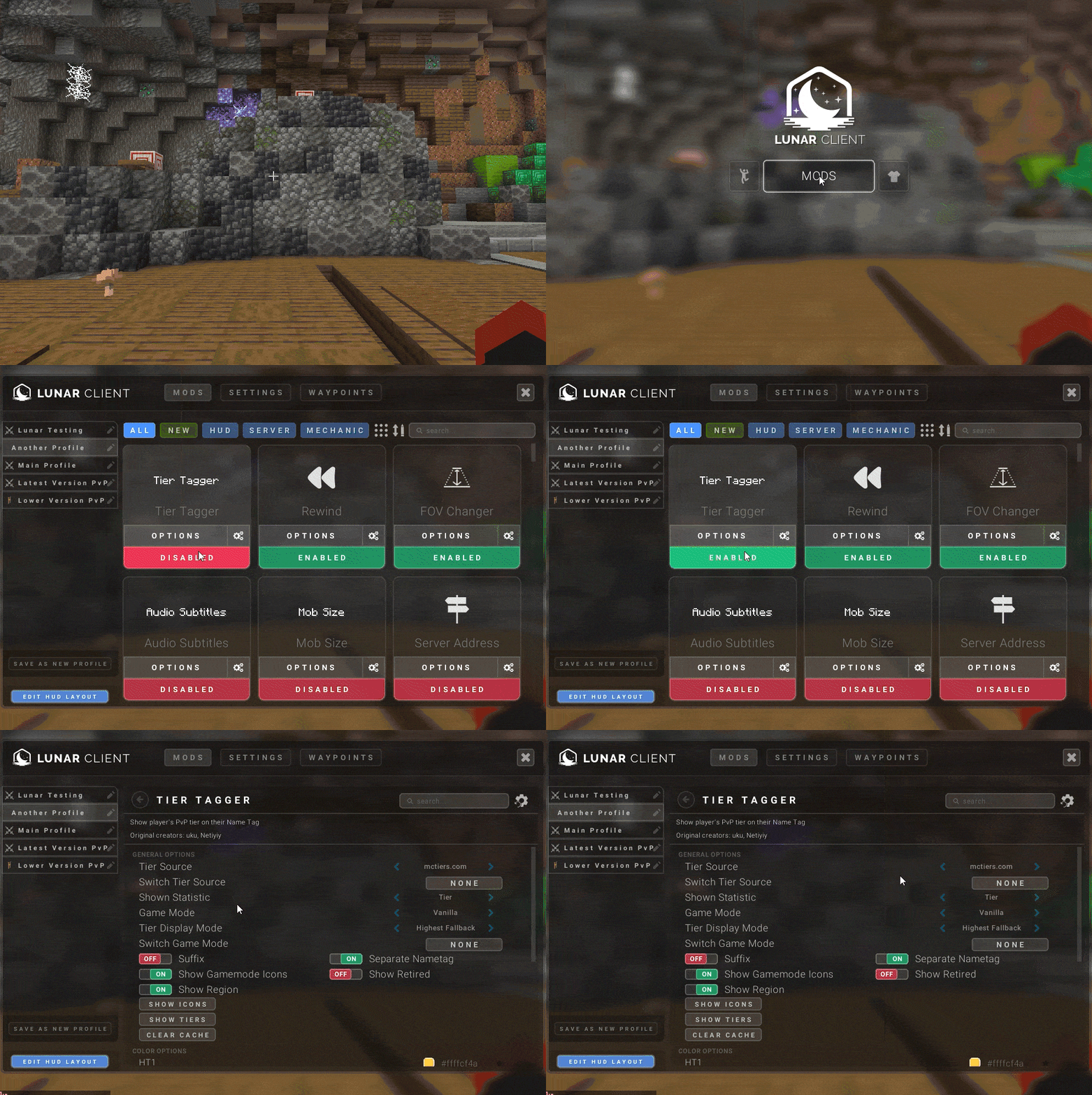
To enable Lunar Client’s Tier Tagger Mod, ensure that you have Lunar Client installed. Once you’ve launched your desired version and you’re on a multiplayer server, press RIGHT-SHIFT. Click on Mods and then search for ‘Tier Tagger’. After you’ve found the mod, if not already enabled click button to enable the mod. From there, you can click on the ⚙ icon to start customizing the mod to your liking.
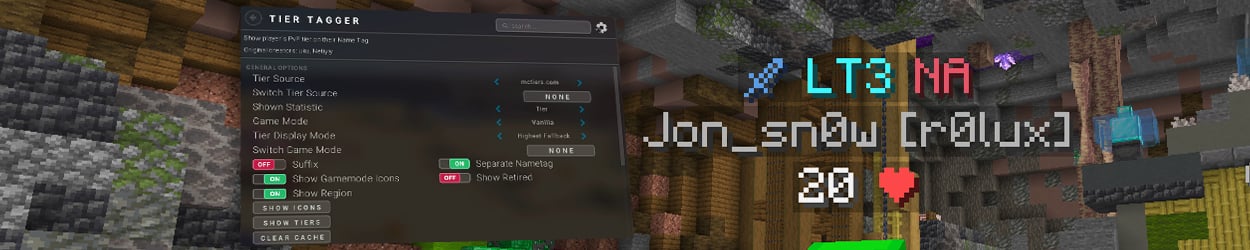
Inside the Tier Tagger Mod
After you’ve opened the Tier Tagger mod’s settings page, you’ll find yourself with a plethora of settings you can enable/disable and customize to your liking. Let’s go over some of the settings that you can start playing around with.
Tier Sources
The Tier Sources setting allows you to change the site that the mod reads information from. Currently, we have four sites that we grab information from: mctiers.com, subtiers.net, tiertests.com, and pvptiers.com. You can set a keybind to easily change the Tier Source whenever you like. You can also display the type of statistic shown, whether that’s someone’s tier or overall ranking.
Game Mode
This setting allows you to view which Minecraft gamemode you want to prioritize. The tier sources provide players with a variety of gamemodes they can choose from, like Mace, UHC, Elytra, Sword, Axe, Pot, SMP, Netherite Pot, and Crystal. As previously stated, with the Tier Source feature, you can select a keybind to use to change gamemodes whenever you’d like.
Tier Display
The Tier Display feature showcases the player’s tier depending on the setting that is selected. If you chose “Selected Only”, the mod will only display the tier in the selected gamemode. Choosing the "Highest Fallback” setting will show the player’s highest overall tier if a player isn’t ranked in the selected gamemode you chose. And finally, if you have “Highest Always” set, the tier tagger mod will always show a player’s highest tier.
Customization Options
We have a variety of customization options for players to choose from. Players can change the color of someone’s tier, giving them a better indication of how skillful a player truly is. If you wish to know which icons correspond to what for each Tier Source, there is a button called Show Tiers that will display a list of gamemodes and their respective icons from each of the four Tier Sources provided. Players can also disable/enable Suffix, Separate Nametag, and Show Retired.
If you have any questions or are experiencing issues with your client, create a ticket on our Support Website or join the Lunar Client Discord server! If you are unsure of how to create a ticket, please view the Lunar Client Support Guide.
