With Lunar Client’s official release of Coins, players can now use an in-game currency, which can be used on Lunar Client’s Store. With Coins, you can purchase emotes and cosmetics! Read more to find out what you can purchase with Coins, how to purchase Coins, and more.

How do I purchase Coins?
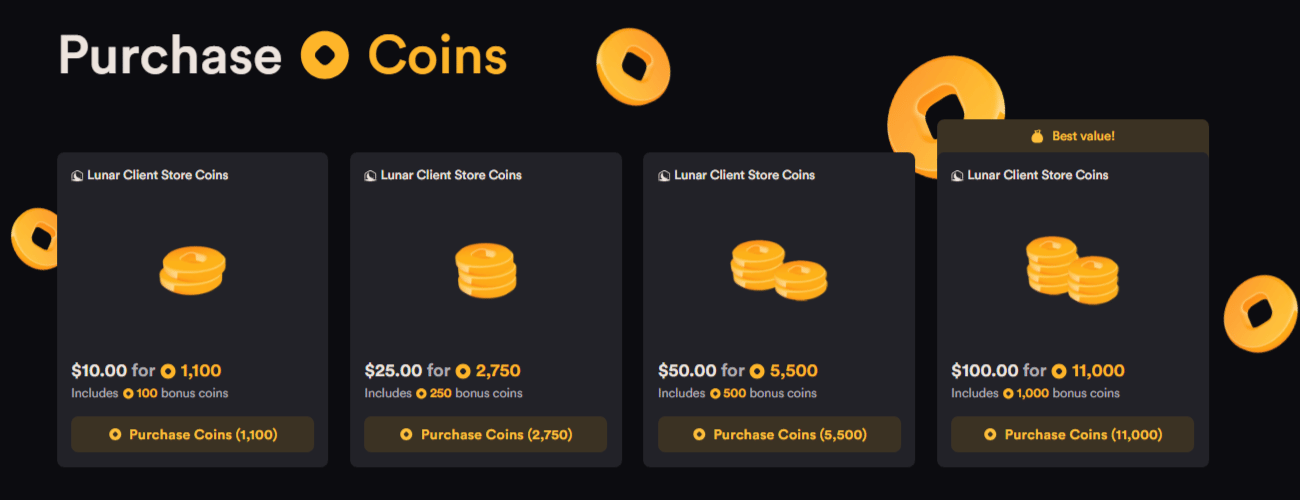
To purchase coins, head over to the "Coins" category of the Lunar Client Store or by clicking your balance visible at the top of any Lunar Client store page. Appearing as a shiny yellow coin, you can see your balance inside the Lunar Client launcher or in the Lunar Client store. To check your balance on the Lunar Client store, make sure you are logged in to the website with your Microsoft account. As a bonus, purchasing cosmetics with Coins grants a 5% discount, which can be stacked with other discounts (including the Lunar+ discount). You can also gain bonus Coins along with your Coins purchase, depending on the amount of Coins you purchase.
What can I get with Coins?
With Coins, you can purchase any cosmetic or emote of your choice, including Bundles! Unfortunately, with Coins, you will not be able to purchase Lunar+, Radio, or Jams. Some bonuses to purchasing Lunar Client Coins are that they do not expire. Coins are tied to your UUID, keeping them safe in your account only. Note that there is also a capped balance of $500 USD tied to your account, totaling 55,000 Coins.

Gifting Coins
If you are interested in gifting friends, you can also gift Coins. Since the Lunar Client store has a gifting system, gifting Coins should be just as easy. Coins are a simpler way of gifting a friend cosmetics, as it allows them to choose whichever cosmetic they desire without the extra pressure of picking one quickly. Essentially, it gives you more time to think about what cosmetic you’d like to claim. To gift Coins, you must be logged into the Lunar Client store with your Microsoft account.
Transfers and Exchanges
Just like cosmetics, you cannot transfer Coins between accounts or exchange them back to real money. While we typically do not offer refunds, if you believe you are eligible for a refund as per our terms of service, please make a Payment Support Ticket.
