
We’re back with Lunar Recap for the month of February! This month, the team has been hard at work cooking up many new updates for the client, including a brand new mod making, a bunch of Badlion Parity features for our SkyBlock Mod, improvements to the Launcher’s responsiveness and interface, and much more! So, without further ado let’s jump right into our Launcher Updates for this month.
You can also check out this month’s Lunar Client recap video below!
Launcher Updates
Starting off, our Launcher received a few tweaks to not only make it feel more responsive, but also to improve its interface. This includes hiding certain features of the client when browsing through certain menus, improving the overall stability and performance by preventing your computer from having to load unnecessary parts of the Launcher.
New Minecraft Snapshot
This month, we also bumped our public snapshot release to the latest version at the time of writing the Recap. With Snapshot 9, you can get early access to some of Minecraft’s latest features, such as the new baby models for some of the mobs, as well as various technical changes, if that’s your cup of tea. It’s important to note that these versions are still in beta, so if you encounter any issues when using the client while playing on any unreleased version, make sure to open up a ticket through our support page so we can get them fixed as soon as possible!

Badlion Client Parity & Skyblock
We implemented a ton of highly-requested Skyblock features from Badlion Client this month. Below, we’ll go over some of the most notable ones.
Firstly, we’ve added Wardrobe Hotkeys. This makes switching between different armor sets a whole lot easier, as now, you’ll just need to press the button associated with the slot in your wardrobe to immediately swap to that set. Combined with the Inventory Buttons feature, you can quickly get in and out of the wardrobe menu in less than a second, without having to fumble through different armor sets.
Next, for those who just can’t remember how to spell any of the different warps, the brand new Warp Autocomplete feature makes this much easier, as you can now quickly scroll through and even tab for different warps, making jumping through different islands hassle-free.
Digging into the Garden, sifting through Visitors has never been easier since the addition of our Garden Visitor Profit. By simply hovering over the Accept button, you can see how much profit you’ll make after purchasing the needed items for the offer, if any. If not though, the Decline button will be conveniently highlighted showing you that it’s the best option. If you want to ignore this though, whether you're just grinding to collect all the visitors or for any other reason, you can safely click the non-highlighted option and you’ll be able to continue like normal.
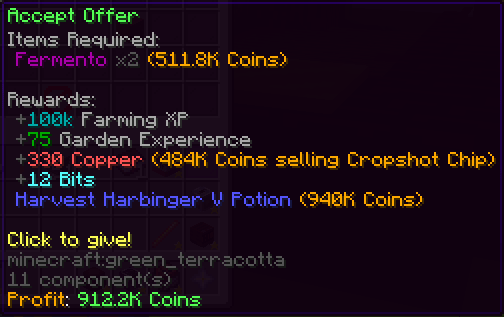
We also added two new shop helpers for both the Hub and the Garden. Many of you have thousands of bits just sitting around in your account, when you could just be turning them into free coins. That’s why with our Bits Shop Helper, you can see which items in the bits shop will earn you the most bang for your buck. On top of this, any item you hover over in this menu will also show the rate for coins to bits for that item specifically. Similarly, if we jump into the Garden, we’ve added a SkyMart Shop Helper, showing you the rate of copper to coins, along with the current best items to ensure you’re earning the maximum profit and aren’t missing out on some free coins.
Finally, the Invincibility HUD saw some nice improvements. The HUD now shows timers for Bonzo and Spirit Masks, as well as for Phoenix Pets, informing you whenever any of these items have activated their invincibility, and when they’ll be ready to use again. On top of this, you can also toggle whether you want this to announce to your party so that they can quickly know when you might need some help.
Overlay Mod
This month, we introduced the brand new Overlay Mod, bringing a massive improvement to the client. With this mod, we’ve finally been able to add one of the most requested features to Lunar Client, that being Held Item Scale.
Within the First Person Settings of the Overlay Mod’s settings, you’ll see a slider to change how big you want your items to appear in your hand. This includes both shrinking to help limit distractions, as well as scaling up if you just want walk around with comedically large tools.
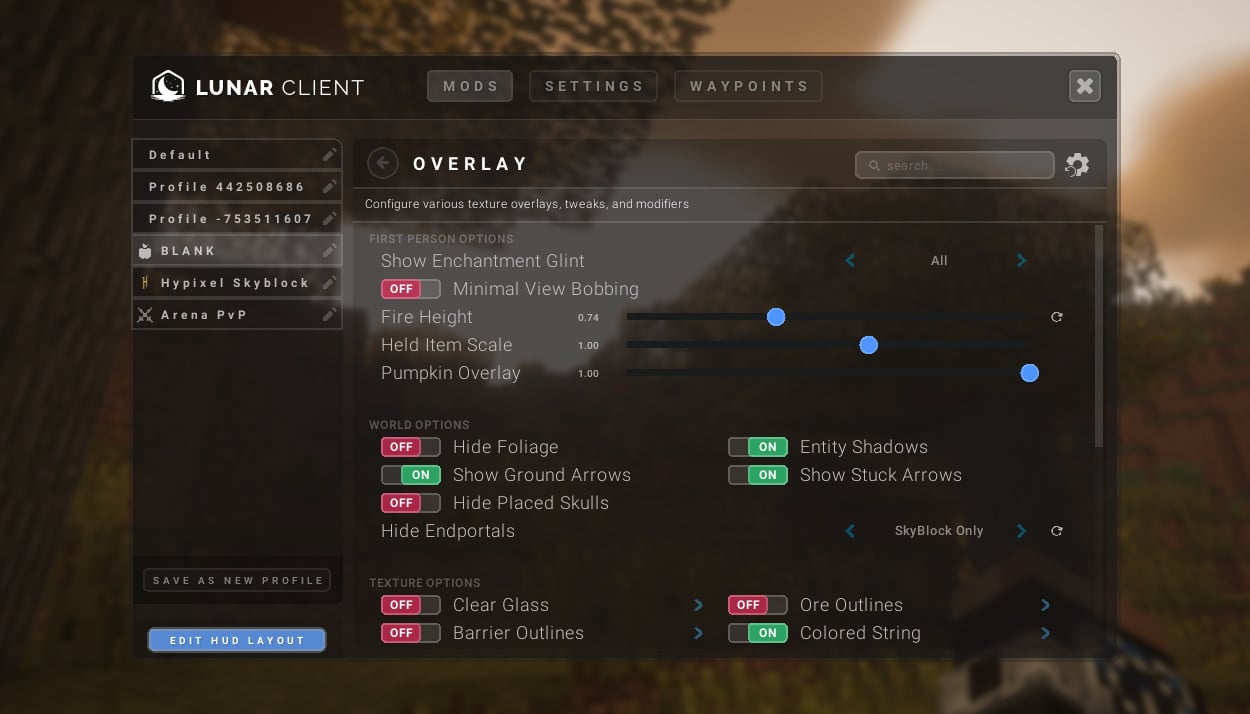
The mod has much more to offer though, as not only did we condense all of our other overlay related features from various parts of the client, but we’ve also added quite a few new ones that can help make your gameplay experience that much better. This includes things such as customizable ore, powdered snow, and barrier outlines, as well as hiding the heads of horses while you’re riding them for better visibility, fully hiding the fire overlay, disabling the death animation, and a ton more. Essentially every visual element that has been toggleable across the client has made its way into this mod, just so you don’t have to spend precious time scouring between different menus to turn off a single feature.
Valentines Collection
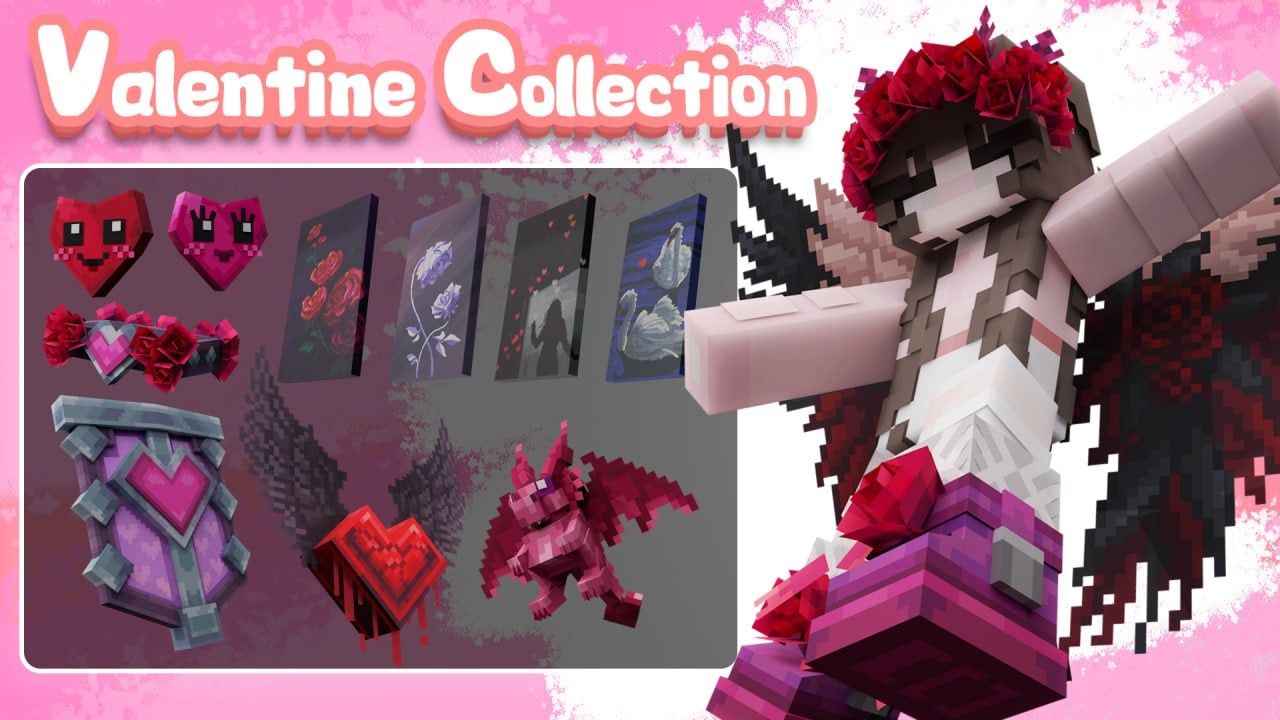
Now before we end off this month’s recap, we have to show off our new Valentines Collection for this year, which brings a few adorable cosmetics for you to fall in love with. This includes an extremely cute Valentines Dog pet, Rose Wings, and much more. So if you’re looking for the perfect Valentines gift to give your “e-partner,” be sure to check out the collection here!
If you have any questions or are experiencing issues with your client, create a ticket on our Support Website or join the Lunar Client Discord server! If you are unsure of how to create a ticket, please view the Lunar Client Support Guide.
